
To figure out your conversion rate, you simply divide the number of conversions by the total number of visitors and then multiply that by 100. That gives you a percentage. The formula itself is dead simple, but the real trick is getting crystal clear on what a 'conversion' actually is for your business.
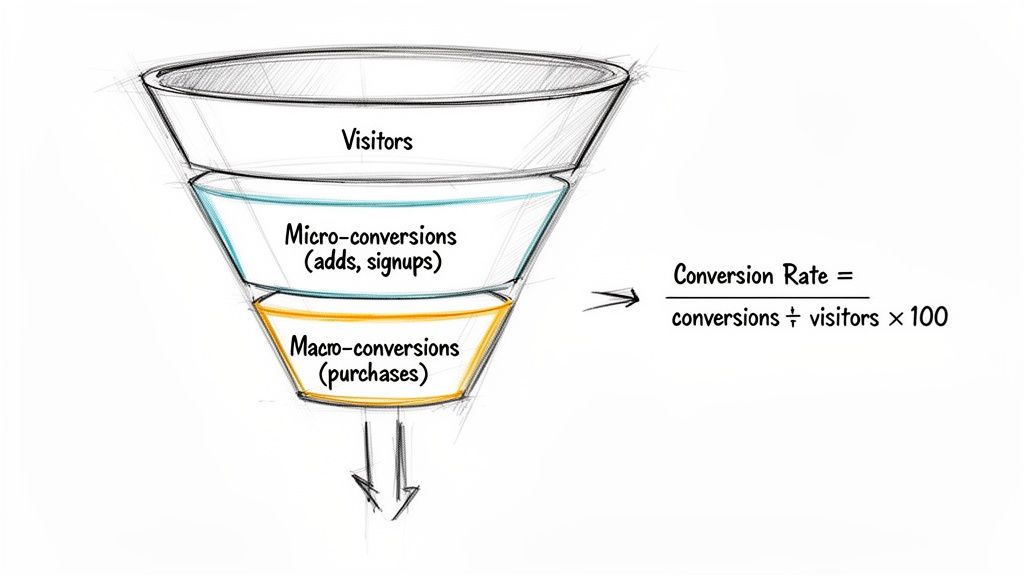
Before you even think about opening a spreadsheet, let's nail down what this metric really means. It's not just another number on a dashboard; it’s a direct measure of how well your website or campaign is persuading people to do what you want them to do.
A single percentage can tell you if your messaging is hitting the mark, if your user experience is clunky, or if your offer is actually compelling enough for someone to act on.
But here’s where a lot of people go wrong: not all conversions are equal. A common mistake is to obsess only over the final sale. The most switched-on marketing teams look at the entire journey, which means tracking two very different kinds of conversions.
Think about your main business objective—that’s your macro-conversion. This is the big one, the action that directly impacts your bottom line. For an e-commerce store, it's a completed purchase. For a B2B business, it might be someone submitting a "Request a Demo" form.
Then you have micro-conversions. These are the smaller, incremental steps a user takes on their way to that big goal. They're signals of interest and engagement, even if they don't immediately ring the cash register.
Here’s how they break down:
Macro-Conversions (The Big Goals):
Micro-Conversions (The Smaller Steps):
Tracking both gives you a much richer story. A low macro-conversion rate might seem discouraging, but if you have a high micro-conversion rate (like heaps of 'add to carts'), it tells you the problem isn't your product—it’s probably your checkout process.
This level of detail is crucial for any business wanting to properly measure campaign effectiveness. For instance, the Australian e-commerce market has an average conversion rate of around 1.78%. That means for every 1,000 visitors, only about 18 will actually buy something. Understanding the micro-steps leading to that purchase is how you start to improve that number.
To start putting this into practice, you can explore some effective conversion rate strategies for Facebook ads to see how you can boost your campaign's potential. This foundation of defining your goals helps you set clear, meaningful KPIs that tie your marketing efforts directly to business outcomes.
Calculating your conversion rate is a complete waste of time if you're working with dodgy data. Before you can measure anything meaningful, you need a rock-solid tracking setup that actually captures the right actions, accurately. Bad data doesn't just give you a skewed percentage; it leads to bad decisions and torches your ad spend.
It all starts with defining what a "win" actually looks like for your business. In Google Analytics 4 (GA4), these wins are called key events (you might remember them as 'conversions' in the old system). You have to explicitly tell GA4 which user actions matter. A standard 'page_view' isn't a business goal, but an event you create called 'generate_lead' or the default 'purchase' event absolutely is.
Getting your key events configured in GA4 is your first job. Out of the box, GA4 might only be tracking purchases as a key event for e-commerce sites. You need to jump into your GA4 admin settings and manually flag the other events that are important to your bottom line.
Think about your big-ticket macro-conversions and set up events for them. These could be things like:
Once you’ve marked an event as a key event, GA4 starts calculating two crucial metrics against it: the session key event rate and the user key event rate. This gives you a much clearer, more realistic picture of performance than just counting raw event triggers.
GA4 is just one piece of the puzzle. You also need to think about platform-specific tracking. If you’re running ads on Meta, LinkedIn, or Google Ads, you absolutely must install their tracking pixels (or tags) on your website.
These little snippets of code are everything when it comes to attribution. They’re what connect a conversion that happened on your site back to the specific ad or campaign that sent the user there in the first place. Without them, you're flying blind, completely unable to prove the ROI of your ad campaigns. A deep understanding of your PPC ad management strategy is key here, as these pixels directly inform how you optimise your campaigns.
A common mistake is relying solely on one platform's data. Each platform (GA4, Meta, etc.) attributes conversions differently. A robust setup uses a combination of analytics and platform pixels to build a comprehensive view of the customer journey.
For businesses juggling numerous tracking codes, things can get messy, fast. This is where a tool like Google Tag Manager (GTM) becomes a lifesaver. GTM acts as a container for all your tracking scripts, letting you deploy, update, and manage them from a single dashboard—no more bugging a developer every time you need to tweak your website's code. This organised approach makes sure your tracking is not only accurate but also scalable as you grow.
A site-wide conversion rate is a great health check, but relying on it alone is like judging a footy match by the final score without watching the game. It tells you who won, but not how or why. The real, actionable insights that drive growth are found when you start segmenting your data and asking more specific questions.
A decent overall metric can easily mask major performance issues. For example, your desktop conversion rate might be fantastic, pulling up the average while your mobile experience is actively costing you customers. Without digging deeper, you'd never know where to focus your optimisation efforts.
The first place to start is breaking down your conversions by traffic source and device type. This isn't just an academic exercise; it's essential for smart budget allocation. You need to know which channels are delivering value and which are just draining your resources.
Think about this common scenario for an Australian online retailer:
Each of these channels will naturally have a different conversion rate. Lumping them all together gives you a blended, and frankly, unhelpful number. Calculating the rate for each channel separately shows you what’s really working.
For a deeper dive into related metrics, it's also worth understanding the nuances of what click-through rate means for your top-of-funnel performance.
The Australian market clearly shows why device segmentation is non-negotiable. Desktop users in Australia convert at an average rate of 3.2%, while mobile users are far behind at only 1.8%. That’s a massive 78% difference that fundamentally changes how you should interpret your data. If you’re not calculating these separately, you’re missing a huge part of the story. You can explore more about these marketing statistics for Australia to see how these trends impact strategy.
To calculate conversion rates for each channel, you just apply the same core formula but use segmented data. Instead of total site visitors, you use the visitors from a specific source.
(Conversions from Channel X / Total Visitors from Channel X) * 100 = Channel X Conversion Rate
Let’s imagine an Aussie e-commerce site gets 10,000 visitors in a month, resulting in 200 sales for an overall conversion rate of 2%. Not bad. But when we segment it, the picture changes completely.
Here's how that 2% average can hide the real story. One look at this table and it’s immediately obvious where the problems—and opportunities—are.
| Marketing Channel | Visitors | Conversions | Conversion Rate (%) |
|---|---|---|---|
| Organic Search | 4,000 | 120 | 3.0% |
| Paid Social | 5,000 | 50 | 1.0% |
| Email Marketing | 1,000 | 30 | 3.0% |
| Total | 10,000 | 200 | 2.0% |
This segmented view tells you that Paid Social is underperforming significantly. Instead of blindly pouring more money into it, you now know to investigate the campaigns, targeting, or landing pages associated with that channel.
Of course, this kind of analysis hinges entirely on accurate tracking. Without trustworthy data, you're just guessing.
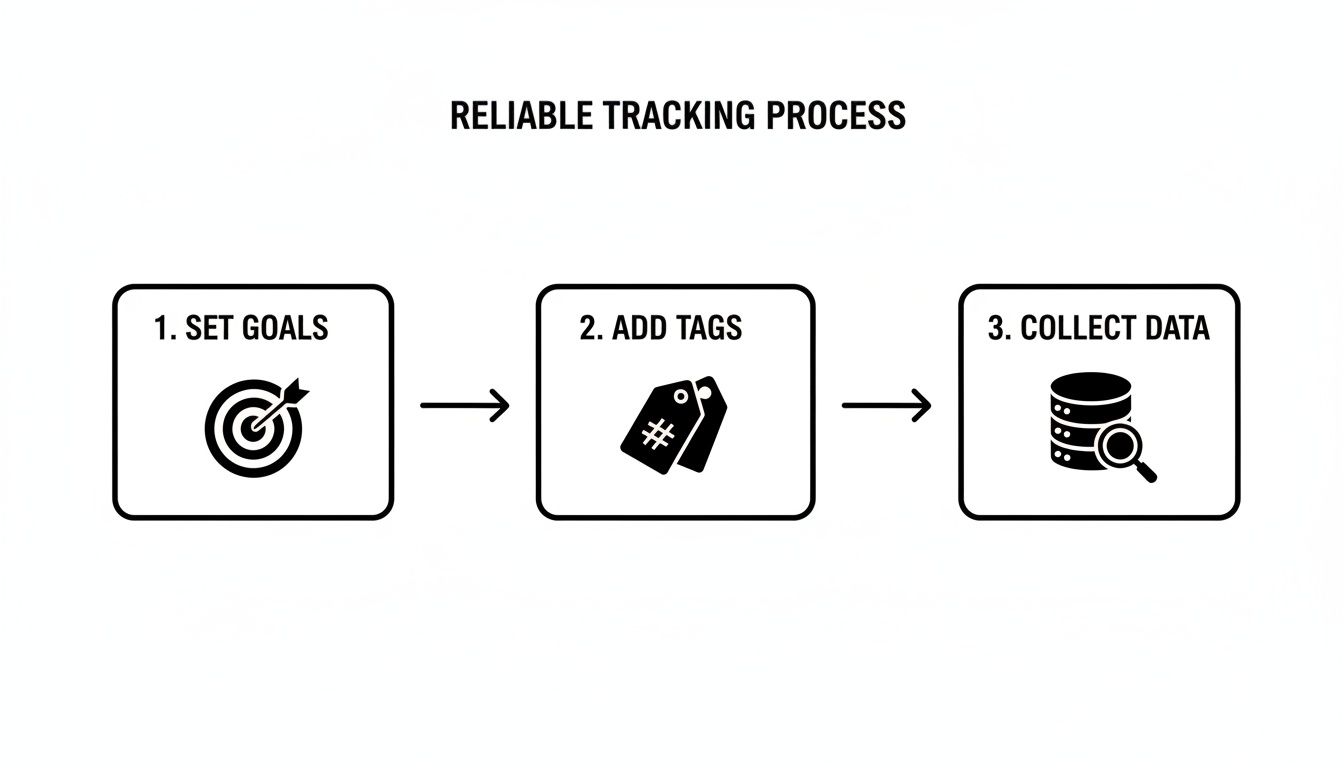
This simple workflow—setting clear goals, implementing the correct tags, and then collecting the data—ensures your numbers are solid. It's the foundation that makes your channel-specific calculations meaningful and, most importantly, actionable.
Alright, theory's one thing, but the real magic happens when you get your hands on your own data. This is where the tools you already use every day, like Google Sheets or Microsoft Excel, become your secret weapon for tracking performance. You really don't need a fancy, complex business intelligence platform to get started—a well-organised spreadsheet is often the clearest way to see what's actually going on.
The first move is getting your data structured properly. Forget about messy data dumps from various platforms. You want to create a clean, simple table with dedicated columns. At a bare minimum, you'll need columns for:
Once you have this structure, the calculations become dead simple.
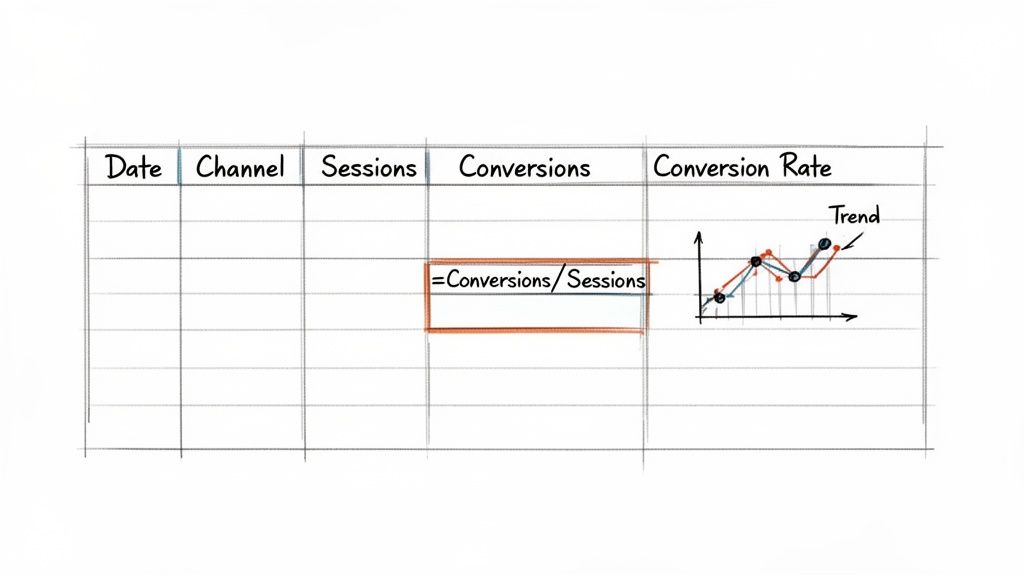
This sketch gives you a good idea of a basic setup. With a simple formula, you can calculate the rate, and a chart can instantly show you the trends over time.
Let's get practical. Imagine you've set up your sheet with 'Conversions' in column D and 'Sessions' in column C, starting from the second row. In a new column, you can pop in a formula to crunch the numbers for that row.
In Google Sheets or Excel, the formula is:=(D2/C2)
Easy, right? Next, just format that cell as a percentage to make it readable (e.g., 2.5%). Now for the best part: just grab the little corner of that cell and drag the formula all the way down the column. Boom. You've automatically calculated the rate for every channel and time period in your sheet, letting you see your top performers at a glance.
The real power of a spreadsheet isn't just in the calculation; it's in the visualisation. Use your data to create simple line charts to track your overall conversion rate over time, or bar charts to compare the performance of different marketing channels side-by-side.
Once you have your raw data and calculations humming along in one sheet, you can take it a step further by creating a separate "Dashboard" tab. This new sheet can pull the most important figures from your data tab to give you a high-level overview without all the noise.
You can use pivot tables or straightforward formulas like SUMIF to group your data, showing total conversions per channel or the average conversion rate for the last 30 days. This simple step turns your spreadsheet from a static list of numbers into a dynamic tool for genuine analysis.
Of course, while spreadsheets offer amazing flexibility, sometimes you just need a quick answer or want to double-check your own maths. For those moments, a dedicated tool like a free online Conversion Rate Calculator can be a lifesaver. It helps you verify your formulas and get instant results without any setup. By mastering these basic spreadsheet skills, you give yourself a practical, repeatable process for measuring what truly matters.
Calculating your conversion rate is the easy part. The real growth comes from understanding the story that number is telling you. A raw conversion rate, looked at in isolation, is almost useless. To turn it into a strategic tool, you need to give it context by comparing it against meaningful benchmarks and pairing it with other vital business metrics.
The most common mistake I see is people immediately Googling "good conversion rates" for their industry. While those averages might offer a loose sense of direction, they're often misleading. Think about it: a high-ticket B2B software company will naturally have a vastly different conversion rate than an online store selling $20 t-shirts. Your most important benchmark is always, without fail, your own historical data.
Before you even think about your competitors, get laser-focused on establishing your own baseline. Start tracking your conversion rate week-over-week and month-over-month. Is it trending up or down? This internal comparison is far more actionable because it reflects the real changes you've made to your own website, campaigns, and offers.
A sudden drop might flag a technical bug in your checkout process. A steady increase could validate that new ad campaign you just launched. This is the data that helps you make actual decisions, not chasing some vague industry percentage that doesn't account for your unique business model or traffic quality.
Your goal isn't just to hit an arbitrary number. It’s to achieve consistent, incremental improvement against your own past performance. This focus on internal progress is what separates sustainable growth from chasing vanity metrics.
A high conversion rate is great, but it doesn't paint the full picture of profitability. To truly understand your marketing performance, you need to analyse it alongside other key business metrics. This is where you connect your marketing efforts directly to the bottom line.
For a complete health check, you should always combine your conversion rate with these two metrics:
By looking at these three metrics together, you move from simply asking "how many converted?" to asking the much smarter question: "how many converted, what was their value, and was it profitable?" This holistic view is fundamental to building a successful strategy. To get a better grasp on this, you can learn more about the crucial digital marketing performance metrics that provide this complete view. This deeper analysis is how raw data becomes a clear story that guides your next strategic move.
Even with the best of intentions, it’s frighteningly easy to end up with wonky data that quietly sabotages your marketing strategy. Making decisions based on flawed numbers is worse than just going with your gut; it gives you a false sense of confidence that you're on the right track when you might be heading for a cliff.
Getting to grips with the common pitfalls is the first real step towards ensuring your data is clean, reliable, and actually useful.
One of the most frequent errors we see is teams forgetting to filter out their own traffic. Every time your marketing team, your developers, or your agency visits the website, they create a session. If these visits aren't properly excluded, they inflate your visitor count without adding any conversions, which artificially tanks your conversion rate.
Another massive blind spot is failing to track how modern customers actually behave. People rarely start and finish their entire journey on a single device. A typical path looks something like this: a customer discovers your product on their mobile during their commute, researches it later that evening on a tablet, and finally pulls the trigger and makes the purchase on their desktop computer at work.
If your tracking isn't sophisticated enough to connect these different touchpoints, you might mistakenly attribute the conversion solely to the final desktop visit. This can lead you to undervalue your mobile-focused marketing, potentially cutting the budget for the very channels that are bringing new customers into your world.
Key Takeaway: A user's path to purchase is not a straight line, nor is it confined to one screen. Overlooking this complexity means you're only seeing a fraction of the full picture, leading to misinformed decisions about where your most valuable customers are really coming from.
It’s tempting to hit the panic button when you see a sudden dip or spike in your conversion rate, but making big strategy changes based on a tiny data set is a classic mistake. A single good or bad day is just noise, not a trend.
For any change in your conversion rate to be considered statistically significant, you need to have a large enough sample size of both visitors and conversions. Acting on data from just a handful of transactions can lead you to "fix" problems that don't actually exist or ditch a new strategy before it's had a fair chance to prove itself.
Always give it time. Let enough data pile up before you start drawing firm conclusions. By sidestepping these common traps, you build a foundation of trustworthy data, allowing you to calculate your conversion rate with confidence and make calls that genuinely drive growth.
This is the million-dollar question, isn't it? The honest answer is: it depends. A "good" conversion rate can vary wildly depending on your industry, the source of your traffic, and even the price of what you're selling.
Instead of chasing a generic number you read in a blog post, your best bet is to benchmark against your own historical performance. The real goal here is consistent, incremental improvement. Focus on beating your numbers from last month or last quarter.
Jump into Google Analytics 4 (GA4), and you'll spot two key metrics: session key event rate and user key event rate.
Think of it like this: the session rate tracks conversions per visit (how many sessions resulted in a conversion), while the user rate looks at the unique people who converted. You can easily add these metrics as columns in standard reports, like the Traffic Acquisition report, to see which channels are pulling their weight.
The first step is always to figure out where the leaks are. Start by segmenting your data to find the underperformers. Are conversions tanking on mobile devices? Is a specific paid search campaign burning cash with nothing to show for it? Is one of your key landing pages dropping the ball?
Once you've identified these problem areas, you know exactly where to focus your optimisation efforts for the biggest impact.

 previous