
So, how much does an ad on Google actually cost? It’s the million-dollar question, isn't it? While there’s no single price tag, a typical Australian business usually invests somewhere between $1,000 to $10,000 per month on their Google Ads campaigns. For a single click, the average cost-per-click (CPC) often lands between $2 and $4, but this figure can swing wildly depending on your industry and what you’re trying to achieve.

Think of Google Ads less like buying a product off the shelf and more like entering a real-time auction. Every single time someone searches for a keyword you’re targeting, you’re thrown into a lightning-fast auction against other businesses all vying for that person's attention. You tell Google the maximum you’re willing to pay for a click, but the good news is you don’t always pay that full amount.
This auction system is precisely why there's no simple price list. Your cost is decided by a constant tug-of-war between what you’re willing to bid and what your competitors are putting on the table. It’s a fluid marketplace where prices shift based on demand, relevance, and the quality of your ads. To get a handle on what your own investment might look like, it pays to dig into a realistic cost breakdown of Google Ads, which unpacks all the moving parts.
Australia's digital advertising space is a competitive one, and that directly influences what you'll pay. Recent data shows Australia's average cost-per-click jumped a hefty 12.88% to hit $5.26, highlighting just how much demand there is for those top ad spots.
For businesses in high-stakes sectors like legal services, finance, or insurance, it's not uncommon for a single click to cost anywhere from $10 to $50—sometimes even more. On the flip side, many e-commerce brands and local service providers often see much lower costs, typically in that $2 to $4 sweet spot.
This means Aussie businesses have to be smart. Just throwing more money at your bids isn't a sustainable path to victory. Success really comes down to understanding the nuances of the auction and fine-tuning your campaigns for maximum efficiency.
The key takeaway is that you are in control. Your budget, your bidding strategy, and the quality of your ads are the primary levers you can pull to manage how much a Google ad costs for your specific business.
Throughout this guide, we'll break down exactly how you can use these levers to your advantage, making sure every dollar you invest works as hard as possible to hit your goals.
To really get your head around what an ad on Google will cost you, it helps to look under the bonnet and see how the whole engine runs. Google doesn't just charge a flat rate for an ad. Instead, you've got a few different ways to pay, and each one is tied to a specific action someone takes. Picking the right one is like choosing the right tool for a job—it all comes down to what you’re trying to build.
The main three you'll come across are Cost-Per-Click (CPC), Cost-Per-Mille (CPM), and Cost-Per-Acquisition (CPA). Think of them as different ways to pay for the results you want. You can pay when someone shows interest, when you just want to get in front of them, or only when they actually become a customer. Your business goals are what will point you to the model that makes the most sense.
Let's break these down with some simple analogies to cut through the jargon and show you where your money actually goes.
Cost-Per-Click, or CPC, is the bread and butter of the Google Search Network. It’s pretty straightforward: you only pay when someone is interested enough in your ad to physically click on it and land on your website.
Imagine your ad is a digital shopfront. You wouldn't want to pay rent for every single person who just wanders past the window. With CPC, it’s like you only pay a small fee when a potential customer actually opens the door and steps inside. This approach is perfect for businesses focused on driving quality traffic, generating leads, or making sales right there and then.
You set a maximum CPC bid—the most you're willing to pay for that one click—but thanks to the way the Google Ads auction works, you often end up paying less. It’s a direct, measurable way to invest in people who are actively looking for what you offer.
Next up is Cost-Per-Mille, or CPM. That "mille" bit is just Latin for a thousand. With this model, you pay a set price for every 1,000 times your ad is shown to people, whether they click it or not.
Think of CPM like renting a billboard on a busy highway. The goal isn't to get every single driver to pull over and visit your store immediately. It's about making sure thousands of them see your brand name. It's all about visibility and awareness. This is why you'll see CPM used most often for Display and YouTube campaigns, where getting your brand in front of as many relevant people as possible is the name of the game.
If your main goal is brand awareness—making sure your target audience knows who you are—then CPM is a really effective and often budget-friendly choice. It’s about maximising reach, not direct action. To see how the numbers work, you can explore the cost per impression formula in more detail.
Finally, we get to Cost-Per-Acquisition, or CPA. This is where things get really focused on your bottom line. With CPA, you only open your wallet when a click on your ad leads to a specific action you want—what we call a "conversion."
A conversion can be whatever you decide is valuable for your business:
This model is like hiring a salesperson purely on commission. You don't pay them for just showing up or making small talk; you pay them when they actually close the deal. For any business that's laser-focused on ROI, targeting a specific CPA is one of the smartest ways to make sure your ad spend is directly fuelling real business results. It lets you answer the crucial question: "How much am I willing to pay to get a new customer?"
Ever wondered why one click on a Google ad costs you $2, while another sets you back $50? It’s not random. The price is set in a dynamic, real-time auction that happens billions of times a day, and understanding how it works is the key to mastering your ad spend.
It’s not just about who bids the most, either. Google has a sophisticated system that’s actually designed to reward advertisers who give users the best experience.
This means you can’t just throw a huge budget at your campaigns and expect to win. Several interconnected factors come together to decide your final ad cost. Think of it as a complex puzzle where your bid is just one piece. The other pieces—like your ad quality and website relevance—are just as important, and often more so. Learning to influence these factors is how you gain a competitive edge and make every dollar count.
This diagram breaks down the main pricing models used in Google Ads campaigns.
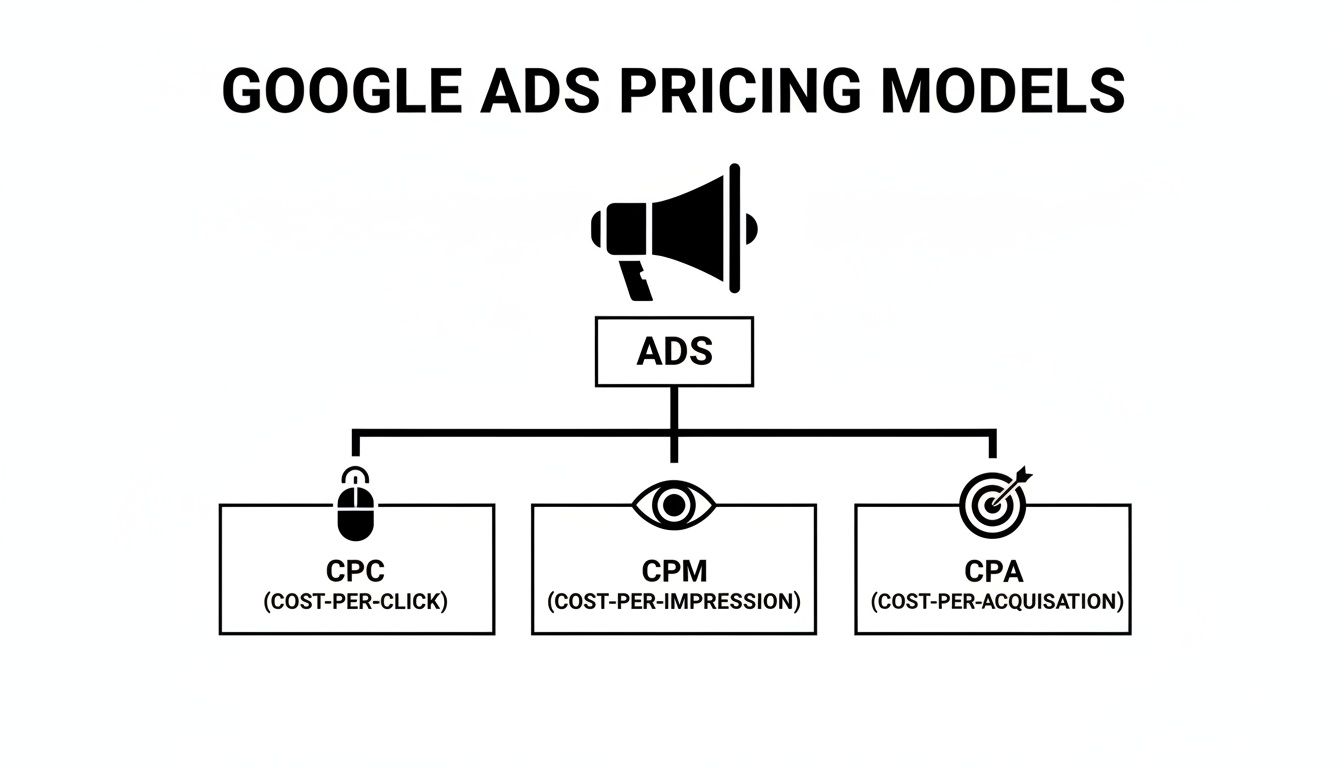
As you can see, the models branch out from driving general traffic (CPC) to securing valuable actions (CPA), reflecting different campaign goals.
At the heart of Google's auction is a metric called Quality Score. Think of it as your "reputation score" with Google. It's a rating from 1 to 10 that Google assigns to your keywords, and it has a massive impact on both where your ad shows up and what you pay for a click.
A high Quality Score tells Google that your ad and landing page are highly relevant and genuinely useful to the person searching. As a reward for creating a great user experience, Google gives you a discount on your cost-per-click and a better ad position. It’s their way of encouraging helpful, high-quality ads instead of just a bidding war. In practice, a strong Quality Score allows smaller businesses with smart campaigns to compete effectively against larger companies with deeper pockets.
A high Quality Score can dramatically lower your actual CPC. It's entirely possible for an advertiser in position one to pay less for their click than the advertiser in position two, simply because their Quality Score is better.
To get your score up, you need to nail its three core components:
While Quality Score is your reputation, Ad Rank is what determines your ad's actual position on the search results page. The calculation is surprisingly simple:
Ad Rank = Your Maximum Bid x Your Quality Score
Every time a search happens, Google calculates the Ad Rank for every eligible advertiser. The ads with the highest scores win the top spots. This little formula shows the powerful relationship between what you're willing to pay and the quality you deliver.
You can get a high Ad Rank in two ways: have a massive bid, or have an excellent Quality Score. For example, an advertiser bidding $4 with a Quality Score of 10 gets an Ad Rank of 40. A competitor bidding $8 but with a Quality Score of only 4 has an Ad Rank of just 32. Despite bidding half as much, the first advertiser secures a higher position.
This is exactly why focusing on improving your Quality Score is one of the most effective ways to lower how much an ad on Google costs.
The keywords you choose to bid on are another huge factor driving your ad spend. The cost of keywords works on a simple supply-and-demand basis.
Highly competitive keywords with strong commercial intent—think "personal injury lawyer" or "buy car insurance online"—are always going to be expensive. Lots of businesses are bidding on them, and a single conversion can be worth thousands of dollars. Legal services, for instance, have an average CPC of around $8.58 in Australia, one of the highest of any industry.
On the other hand, long-tail keywords—more specific, longer phrases like "emergency plumber for leaking pipe in Adelaide"—tend to be less competitive and therefore cheaper. While they have lower search volume individually, their collective traffic can be substantial, and the user intent is often much clearer, which usually leads to higher conversion rates. A smart keyword strategy balances those high-value, competitive terms with cost-effective, long-tail opportunities.
Finally, your targeting settings play a massive role in where your ad budget goes. Google Ads offers several ways to refine who sees your ads, and each one directly impacts your costs.
By strategically using these targeting options, you can focus your budget on the audiences most likely to convert, which is a sure-fire way to improve your ROI and lower your overall cost per acquisition.
Alright, let's move from the 'what' to the 'how much'. This is where the rubber meets the road and you can start to see the real power of Google Ads. One of the biggest mistakes we see is businesses picking a budget out of thin air. A successful campaign doesn’t start with a guess; it starts with a clear, data-informed plan.
We’re going to walk through how to estimate your ad spend and forecast the kind of results you can expect. Don't worry, this isn't about complex algorithms. It's more like reverse-engineering your business goals. By starting with what you want—say, a specific number of new leads—we can work backwards to figure out how many clicks you'll need and what that's likely to cost. It gives you a solid, tangible starting point.
Your first port of call is the Google Keyword Planner. This free tool, tucked inside your Google Ads account, is your window into real-world data. It shows you the estimated cost-per-click (CPC) ranges for the keywords you want to target, right down to your specific city or region. This is crucial for getting a realistic idea of what your competitors are currently paying.
For example, if you search for "commercial cleaning services Sydney," the tool will spit out a CPC range. You might see a low-range bid of $3.50 and a high-range bid of $8.00. This single piece of information is the bedrock of your entire budget forecast.
Once you’ve got an average CPC for your main keywords, you can plug it into a simple formula to map out your budget. All you need are three key numbers: your target number of leads (or sales), your website's estimated conversion rate, and that average CPC you just researched.
Here’s how it breaks down:
This little bit of maths bridges the gap between your marketing ambitions and your financial investment.
Example in Action: Let's imagine an Australian B2B software company in Melbourne wants to generate 20 qualified leads next month. They know from their website analytics that their landing page converts visitors into leads at a rate of 5% (which is 0.05 as a decimal).
Now, let's apply the formula:
With this simple forecast, the marketing team can now go to management with a clear, confident request: "To hit our target of 20 leads, we need an estimated budget of $2,400." This data-driven approach is a world away from just asking for a random amount of cash and hoping for the best.
This estimate also helps you get a handle on a critical metric for your business. To learn more, you can check out our guide on what is customer acquisition cost, which explains how to measure the real cost of winning new business. Building this forecast is the first step in managing and optimising that all-important figure.
Getting great results from Google Ads isn’t about who has the deepest pockets. It’s about spending smarter, not harder. Once your campaigns are live, the real work begins—the continuous process of optimisation that transforms a good campaign into a lead-generating machine.
This is where you can actively dial down how much an ad on Google costs you, not by slashing your budget, but by boosting efficiency. By making small, strategic improvements, you can drive down your cost-per-conversion and stretch every dollar for maximum return on investment (ROI). It's a game of inches where consistent, data-backed tweaks lead to significant gains.
Let's dive into the most effective, actionable strategies you can implement right now to make your ad spend work harder for your business.
We've touched on Quality Score, but its importance can't be overstated. Think of it as the single most powerful lever you can pull to lower your costs. A higher Quality Score is Google’s reward for providing a great user experience, and that reward comes in the form of a lower cost-per-click (CPC). It's an efficiency multiplier for your budget.
So how do you boost it? Start by creating hyper-relevant ad groups. This means tightly themed keywords paired with ad copy that speaks directly to those terms. If someone searches for "emergency plumber Sydney," your ad headline should reflect that exact phrase, not just a generic "Plumbing Services."
This laser focus on relevance improves your expected click-through rate (CTR) and ad relevance—two of the three pillars of Quality Score. The third, landing page experience, is just as crucial. It means ensuring the page they land on delivers precisely what the ad promised, seamlessly continuing the user's journey.
One of the quickest ways to haemorrhage money is by paying for clicks from people who will never become customers. This is where negative keywords become your best friend. They are the gatekeepers of your campaign, stopping your ads from showing up for irrelevant searches.
Imagine you sell premium, high-end furniture. You definitely wouldn't want your ads appearing for searches like "free second-hand furniture" or "cheap flat-pack desk." By adding terms like "free," "cheap," and "second-hand" to your negative keyword list, you instantly filter out unqualified traffic and stop wasting your spend.
Pro Tip: Regularly review your "Search Terms" report in Google Ads. This report shows you the actual search queries that triggered your ads. It's an absolute goldmine for discovering new negative keywords and plugging budget leaks before they become a major problem.
While manual bidding offers granular control, Google's automated Smart Bidding strategies are a game-changer. They use machine learning to optimise for conversions in real-time, analysing thousands of signals during each auction to set the perfect bid for every single search.
A couple of the most effective strategies include:
Letting Google's AI do the heavy lifting frees you up to focus on the big-picture strategy rather than minute-by-minute bid adjustments. It’s a powerful way to improve performance and efficiency, especially at scale.
For example, we worked with an Adelaide-based B2B client who was struggling with a high cost-per-lead. By refining their ad copy to improve Quality Score, adding a robust list of negative keywords, and switching from manual CPC to a Target CPA bidding strategy, we achieved a 32% reduction in their cost-per-lead within just 60 days. This allowed them to generate more qualified leads from the exact same monthly budget, directly impacting their bottom line.
Trying to manage a Google Ads account on your own can feel like taking on a second full-time job. While the DIY route is always tempting at first, there's a tipping point where keyword research, bid management, and the constant need to optimise just demand more expertise than one person can spare.
That’s usually the moment businesses realise that partnering with a specialist agency isn’t just another expense. It’s an investment in getting it right.
An expert team lives and breathes the platform. They bring a deep understanding of advanced bidding strategies and a disciplined approach to testing that’s almost impossible to replicate in-house. This frees you up to do what you do best—run your business—while they make sure your ad spend is working as hard as it possibly can.
So, what does it actually cost to hire a Google Ads agency in Australia? You'll typically find two main ways agencies structure their fees, each with its own pros and cons.
The most common models you'll come across are:
A dedicated agency does more than just set up a few campaigns. They bring strategic direction, relentless performance analysis, and the know-how needed to turn a break-even account into a powerful engine for growth.
Across Australia, you’ll find that agency fees generally fall within a typical range. Most agencies will charge monthly retainers anywhere from $800 to over $5,000, which really depends on how complex your campaigns are. For the percentage-based model, a fee of 10-20% of the monthly budget is pretty standard. You can find some more great insights on agency pricing over at roi.com.au.
Ultimately, the decision to partner up comes down to weighing the cost of professional management against the potential return from a truly optimised advertising strategy.
Even with a solid strategy in place, a few questions always pop up when you're about to lock in a Google Ads budget. Let's tackle some of the most common queries to give you that extra bit of confidence before you dive in.
One of the big draws of Google Ads is its speed, something organic strategies just can't match. You can start seeing traffic and impressions almost the moment your campaign goes live. But seeing meaningful results—the kind that actually impact your bottom line, like consistent leads or sales—takes a little more time.
Think of the first 30 to 90 days as your data-gathering phase. This is the crucial window where you're testing, learning, and optimising. It gives the platform's machine learning enough information to start finding your ideal audience, and it gives you the insights needed to refine what's working. This initial period really sets the stage for long-term, profitable results.
This is a classic question, but it's not really an "either/or" situation. It's more of a "both/and" one. Google Ads is brilliant for immediate, controllable traffic—perfect for launching a new offer or driving leads right now. Search Engine Optimisation (SEO), on the other hand, is the long game. It's about building organic visibility and authority over time, which delivers compounding returns down the track.
The most powerful approach is to combine them. Use Ads for instant results and to gather incredibly valuable keyword data. Then, feed that data directly into your SEO strategy to build a truly dominant and resilient online presence.
For most small to medium-sized Aussie businesses, a starting budget of $1,000 to $2,500 per month is a realistic launchpad. It’s generally enough to gather meaningful data, test your campaigns, and start optimising for conversions without betting the farm.
Of course, if you're in a highly competitive space like law or finance, you might need a bigger initial investment just to get a seat at the table. The key is to start with a budget you’re comfortable testing and be ready to scale it up once you've proven your return on investment. It's also smart to stay across any new Google Ad policy updates that could affect your campaigns and costs.
Ready to stop guessing and start getting real results from your Google Ads budget? The team at Virtual Ad Agency specialises in building and managing high-performance campaigns that drive measurable growth. Book a no-obligation strategy session with us today!

 previous