
Trying to answer "how much does Google Ads cost?" is a bit like asking "how much is a car?". The real answer depends entirely on what model you choose, the features you add, and how you plan to drive it.
For businesses in Australia, the average Cost Per Click (CPC) often floats between $2 and $4, but that’s just a starting point. Your actual cost is a unique mix of your industry, what you want to achieve, and the strategic choices you make along the way.
Think of putting together a Google Ads campaign like you’re building a house. You start with a budget, but the final price tag comes down to the quality of the materials you pick and how complex the design is.
Your ad spend isn't just one big number; it’s a collection of interconnected costs that you're in control of. We're going to break down each piece, giving you a clear blueprint to understand and manage your budget like a pro.
Just like a house has a foundation, walls, and a roof, your Google Ads costs are made up of a few core components. Each one plays a big part in determining what you'll spend and the results you'll get.
Here are the key elements we’ll get into:
Getting your head around how these pieces work together is the first step to building a campaign that doesn't just spend money, but makes it. While lots of platforms have moving costs, understanding what drives them is key. For example, you can get a better sense of how different factors impact the cost of Facebook ads in our other guide.
Here's the most important thing to remember: Google Ads isn't about outspending your competitors. It's about outsmarting them with relevance and quality.
To give you a quick snapshot, here’s a table summarising what you can generally expect when advertising on Google in Australia.
| Metric | Typical Range (AUD) | Key Influencers |
|---|---|---|
| Average Cost Per Click (CPC) | $2 – $4 | Industry competitiveness, Quality Score, keyword choice |
| Average Cost Per Mille (CPM) | $5 – $15 | Audience targeting, ad placement, campaign objective |
| Monthly Budget (Small Business) | $500 – $2,500 | Campaign scope, business goals, market size |
| Monthly Budget (Medium/Large) | $2,500 – $20,000+ | Scale of campaigns, competitive landscape, growth targets |
| Management Fees (Agency) | 15% – 20% of spend | Agency expertise, scope of work, performance metrics |
This table provides a solid baseline, but remember that your specific industry can dramatically change these numbers.
The industry you're in is one of the biggest drivers of your ad costs, hands down. Competition varies wildly across different sectors in Australia.
While that $2 to $4 AUD average CPC gets thrown around a lot, some fields are in a whole different league. For instance, legal services can see an average CPC of $10.61 AUD, and keywords in the insurance world often start around $13.37 AUD.
Because of this, monthly budgets can swing from a modest $1,000 to well over $20,000, all depending on the campaign's scale and ambition. This massive difference is exactly why a "one-size-fits-all" budget just doesn't work for Google Ads.

To really get a grip on what Google Ads will cost you, we need to peek behind the curtain and see how the auction works. There’s a persistent myth that the top ad spot simply goes to the highest bidder. In reality, it’s a much smarter marketplace where relevance and quality are just as valuable as the money you're willing to spend.
Think of it like trying to get into an exclusive nightclub. Having the most cash in your wallet (your bid) doesn't automatically get you past the bouncer. Your style, how you fit the club’s vibe, and your reputation (your ad quality) all play a massive part in whether you even get in, let alone where you get to sit.
Every single time someone types a search into Google, an auction kicks off and finishes in milliseconds. Google scans all the advertisers bidding on keywords related to that search and instantly decides which ads to show and in what order. This decision boils down to two core components.
The auction is decided by much more than just your budget. It's a delicate balance between what you're willing to pay and how good Google thinks your ad actually is.
These two factors work hand-in-hand to create a level playing field:
Your Maximum Bid (Max CPC): This part is straightforward. It’s the absolute highest amount you’ve told Google you’re willing to pay for a single click on your ad. You set this ceiling, but you often end up paying less.
Your Quality Score: This is Google's rating of your ad, keywords, and landing page, all rolled into one. It’s scored from 1 to 10, with 10 being the best. A high score is Google's nod of approval, signalling that your ad is super relevant and useful to the searcher.
This system is built to reward advertisers who create a genuinely good experience for users. It's how Google makes sure people using its search engine find what they're looking for, which is exactly what keeps them coming back.
Quality Score is Google’s secret sauce. It’s the mechanism that allows a small local business with a highly relevant ad to outrank a national competitor with a huge budget but a generic ad.
A strong Quality Score is your most powerful weapon for driving down your advertising costs on Google.
So, how do your bid and Quality Score actually come together to decide where your ad shows up? Google uses a formula to calculate something called Ad Rank for every single advertiser in the auction.
The formula is simple but incredibly powerful:
Ad Rank = Your Maximum Bid × Your Quality Score
The advertiser with the highest Ad Rank wins the top ad position. The one with the second-highest gets the second spot, and so on down the page. This is precisely why your Quality Score is so critical.
Let’s run through a quick example. Imagine two businesses bidding on the same keyword.
| Advertiser | Max Bid (CPC) | Quality Score | Ad Rank (Bid x QS) | Ad Position |
|---|---|---|---|---|
| Advertiser A | $2.00 | 10 | 20 | 1 |
| Advertiser B | $4.00 | 4 | 16 | 2 |
See that? Advertiser A snags the top spot despite bidding half as much as Advertiser B. Their perfect 10/10 Quality Score gave them a higher Ad Rank, proving that relevance really does beat a bigger budget.
This is the fundamental principle that unlocks cost-effective advertising on Google. By focusing on improving your Quality Score, you can secure better ad positions for a lower cost per click, making your budget stretch further and seriously improving your overall return on investment.
Ever scratched your head wondering why one business pays $1 for a click while their direct competitor pays $15? It’s not random, I promise. It's all down to a handful of key variables that Google's algorithm is constantly weighing up. Getting a handle on these is your first step to mastering your budget and figuring out what Google Ads will really cost your business.
Think of it like you're sitting at a control panel with a bunch of levers and dials. Each one you adjust has a direct, and often immediate, impact on what you end up spending. Once you learn what they are and how they work, you can stop just spending money and start actively investing it for a much better return.
The single biggest thing that'll sway your ad costs is your industry and the specific keywords you’re going after. It all boils down to simple supply and demand.
If you’re in a high-value industry where a single new customer is worth thousands of dollars—think law, finance, or specialised home services—you can bet the competition for the best keywords will be fierce.
When you have more advertisers bidding on the same keywords, it naturally drives the price per click up. It’s not unusual to see keywords in the legal sector costing upwards of $8 per click, while a retail business might pay something closer to $2.50 for less fought-over terms.
This infographic lays it out pretty clearly, showing just how dramatically the average cost-per-click can swing from one industry to the next.
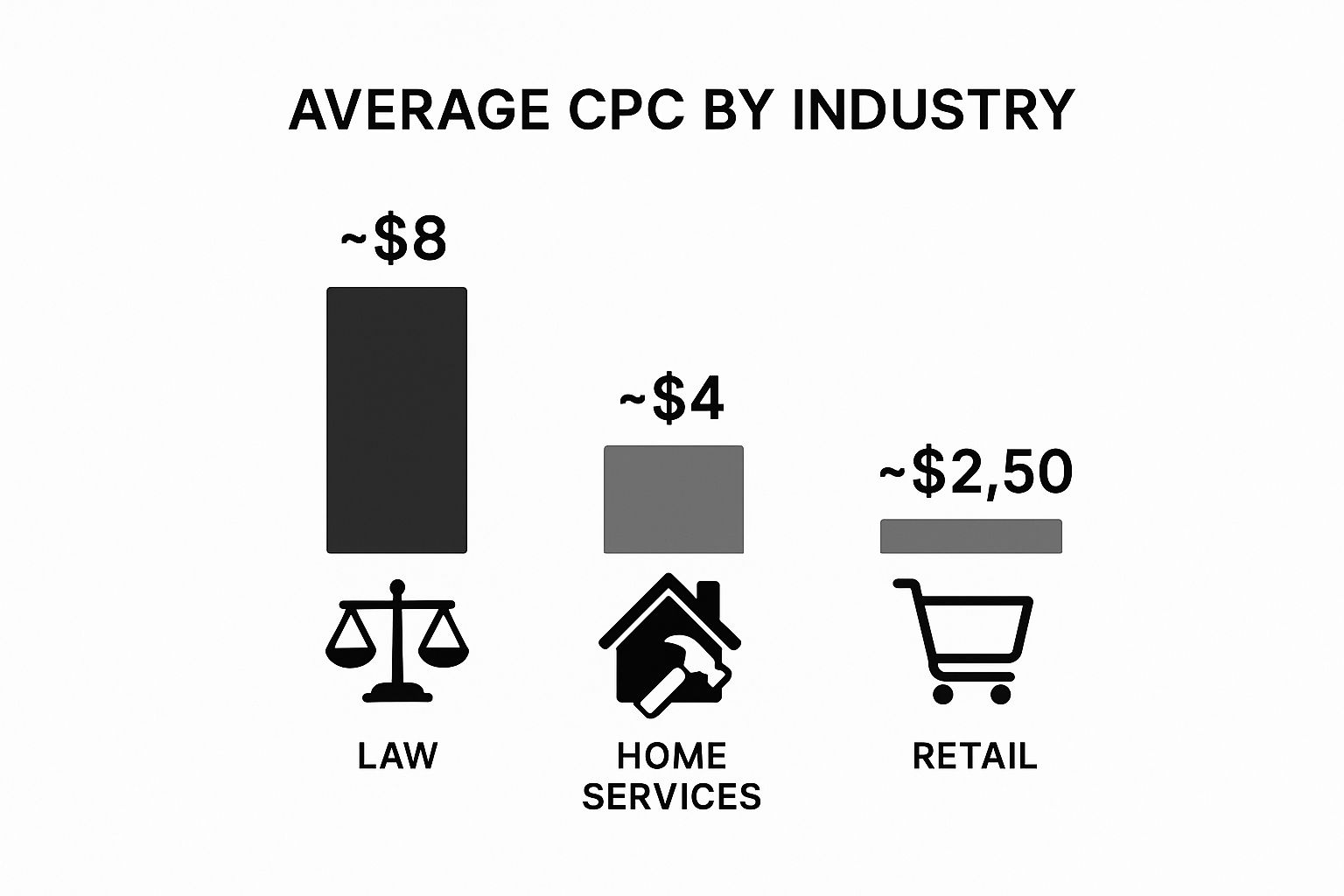
As you can see, high-value services like legal advice command a much higher price tag per click than your everyday retail or home services. This is a direct reflection of the potential payoff in those sectors.
We touched on Quality Score earlier, but it’s so important it’s worth a closer look. This is Google's main way of rewarding advertisers who create a genuinely good experience for users. A high Quality Score is like getting a powerful discount, letting you snag a better ad position for less money.
Let’s break down its three core pillars:
A low Quality Score is basically a tax on your ad spend. If you ignore it, you’ll consistently pay more for fewer clicks and worse positions than your competitors. Simple as that.
Your campaign's targeting settings are another set of powerful levers for controlling costs. Just running your ads everywhere, to everyone, all the time is the fastest way to burn through your budget with very little to show for it.
Here’s how you can tighten up your targeting to get more bang for your buck:
The overall cost of running Google Ads in Australia is a complex mix of all these moving parts. While the average cost-per-click might hover around $2-4 AUD, things can get expensive quickly in competitive fields. For example, e-commerce businesses often enjoy lower CPCs, around $1.82 AUD, but seasonal trends can send this figure soaring during peak shopping times. Truly understanding these influences is the key to making every dollar in your ad spend work harder.
Picking a bidding strategy is like giving Google a set of instructions on how to spend your money. It’s the rulebook for your budget, and choosing the right one is absolutely critical for hitting your campaign goals without burning through your cash.
Think of it this way: are you trying to get as many eyeballs on your website as possible, or are you laser-focused on getting a specific number of sales for a set cost? Each goal needs a completely different instruction manual—or bidding strategy—to guide Google’s algorithm where you want it to go.
The first, and most important, step is to align your bidding strategy with your main business objective. Let’s break down the common approaches based on what you’re actually trying to achieve.
If your main goal is to drive a flood of traffic to your site or just get your brand name in front of as many people as possible, click-focused strategies are your best bet. These are often the simplest to get your head around and work brilliantly for top-of-funnel marketing.
Maximise Clicks: This automated strategy tells Google to get you the most clicks it possibly can within your daily budget. It's like telling your promotional team to hand out as many flyers as they can for a flat daily fee, without worrying too much about who takes one. It's perfect for building brand awareness or driving a high volume of traffic to a new blog post.
Manual CPC (Cost-Per-Click): This one puts you firmly in the driver's seat. You set a maximum bid for each keyword, giving you granular control over what you're willing to pay. This is for the advertiser who loves to tinker, adjusting bids based on how individual keywords are performing.
These strategies are powerful for generating traffic, but they don't automatically care about what happens after the click. For that, you need a more conversion-focused approach. This is where many automated advertising systems shine, including those in the wider digital ecosystem. If you're curious about how automated bidding works on other platforms, you can learn more about the role of automation in our detailed guide on what is programmatic advertising.
When your bottom line is all about generating leads, sales, or another specific user action, you need a strategy that tells Google to hunt for users who are most likely to convert. These automated strategies use machine learning to analyse countless user signals and make bidding decisions in real-time.
A conversion-focused strategy shifts the focus from simply getting clicks to getting valuable actions. It's the difference between measuring foot traffic and measuring actual sales at the register.
Here are the main conversion-based strategies:
Maximise Conversions: With this strategy, you let Google's algorithm take the wheel to get you the most conversions possible for your budget. You don't set a specific cost-per-action goal; you just tell Google to go out and find as many conversions as it can within your spending limits.
Target CPA (Cost Per Acquisition): This is a more advanced option where you specify exactly how much you're willing to pay for a single conversion. For example, you could set a Target CPA of $50, telling Google not to spend more than that, on average, to secure a new lead or sale. It’s like giving a salesperson a clear commission structure for each new customer they bring in.
To help you visualise these options, here's a quick comparison of the most common bidding strategies and what they're best used for.
| Bidding Strategy | Best For | Level of Control | Primary Goal |
|---|---|---|---|
| Maximise Clicks | Driving high volumes of website traffic and building brand awareness. | Low (Automated) | Clicks |
| Manual CPC | Advertisers who want granular control over individual keyword bids. | High (Manual) | Clicks |
| Maximise Conversions | Getting the most possible conversions within a set daily budget. | Low (Automated) | Conversions |
| Target CPA | Achieving conversions at a specific average cost per acquisition. | Medium (Automated with a target) | Conversions |
Ultimately, choosing the right strategy means being honest about your primary goal. Are you building awareness, driving traffic, or generating sales? Your answer will point you directly to the best bidding strategy and help you control your Google advertising costs with confidence.
This is where the theory stops and the real-world planning kicks in. So, how much should you actually be spending on Google Ads? The key is to move away from guesswork and embrace a data-backed approach that works for your business.
First things first: stop thinking about your budget as just an expense. See it for what it is—a direct investment in winning new customers. This simple mindset shift is critical because it forces you to focus on the return you expect, not just the cash going out the door.
To get started, you need to figure out the potential cost of your most important keywords. Luckily, Google’s own tools can be your crystal ball here.
Think of Google's Keyword Planner as your secret weapon for estimating ad spend. It won’t give you a guaranteed price tag, but it serves up data-driven forecasts that are the perfect foundation for a sensible budget.
The tool lets you plug in the keywords you want to chase and see a likely range for what you might pay per click. It’ll show you a "top of page bid (low range)" and a "top of page bid (high range)," giving you a clear picture of just how competitive the landscape is.
Your goal here isn’t to find the absolute cheapest keywords. It’s to understand the market rate for the keywords that will actually drive valuable traffic to your website. This data is the first crucial ingredient in our budget formula.
By digging into your primary keywords, you can land on an average Cost Per Click (CPC) to use in your calculations. Just like that, you’ve moved from a vague guess to a tangible number based on live auction data.
Once you have an estimated CPC, you can start building a budget that’s tied directly to your business goals. You'll just need to know a few key metrics from your own sales process to make it work.
Here’s a straightforward formula to figure out a starting monthly budget:
(Number of Desired Customers per Month ÷ Your Lead-to-Customer Conversion Rate) ÷ Your Website's Lead Conversion Rate × Average CPC = Suggested Monthly Budget
It might look a bit complex at first glance, but let's break it down with a practical example. This approach connects your ad spend directly to the revenue you want to generate. As you set your Google Ads budget, it’s also smart to understand the bigger picture of effective marketing budget planning strategies to make sure everything fits into your company's wider financial goals.
Let's imagine you're a plumber in Sydney and you want to land 5 new customers next month from your Google Ads campaign.
Here are your business metrics:
Now, let's plug these numbers into the formula, working backwards from your goal of 5 new customers.
So, a starting monthly budget of $1,500 is a realistic, data-backed figure for this plumber to aim for. This calculation is a fantastic way to get a handle on your customer acquisition cost—a vital metric for any marketing campaign. If you want to dive deeper, check out our guide that explains what customer acquisition cost is and how to use it.
The budget you just calculated is a starting line, not a finish line. The smartest approach is to begin with a test budget—maybe for one to three months—to gather your own real-world performance data.
During this initial phase, you’ll discover which keywords truly convert, what ad copy actually resonates with customers, and what your CPCs look like in reality. Once you have this data, you can confidently scale your budget up, knowing that every dollar is being invested wisely to grow your business.
Knowing what you might spend on Google Ads is one thing. Actively driving that cost down while getting better results? That’s the real game. Smart optimisation isn’t about finding some secret back door; it’s about applying proven, hands-on techniques that make every single dollar you spend work harder for you.
Honestly, the most effective way to shrink your costs comes down to one central metric: your Quality Score. Improving this single figure is like giving Google a clear signal that your ads are top-notch and relevant. In return, they reward you with a lower cost per click (CPC) and better ad positions. It’s the ultimate win-win.
So, let's get into the practical steps you can take today to start paying less and getting more.
Think of negative keywords as the bouncers for your ad campaign. Their job is simple: turn away irrelevant search traffic before it can click on your ad and cost you money. Without them, you’re basically paying for clicks from people who were never going to buy from you in the first place.
For instance, a business selling high-end, premium furniture would want to add words like "cheap," "free," and "second-hand" to its negative keyword list. This simple move instantly filters out bargain hunters, making sure the budget is spent only on people with genuine intent to buy.
A well-tended negative keyword list is one of the fastest and most powerful ways to slash wasted ad spend. It’s a straightforward fix that can immediately make your campaign more profitable by keeping your ads in front of the right audience.
A classic mistake is cramming dozens of vaguely related keywords into a single ad group. This forces you to write generic ad copy that doesn’t really speak to any one specific search, which tanks your relevance and, you guessed it, your Quality Score.
The solution is to build small, tightly themed ad groups. Each group should focus on a very specific cluster of related keywords. This lets you write highly tailored ad copy that perfectly mirrors what the user is actually searching for.
Here’s a quick example for a digital camera shop:
This targeted approach gives your ad relevance a massive boost, leading directly to a higher Quality Score and a lower CPC.
Your job isn't over when someone clicks your ad. The landing page is where the magic happens—where clicks turn into customers. Google pays close attention to this experience as a key part of your Quality Score, and a slow, confusing, or irrelevant landing page will sabotage all your hard work.
Beyond just fiddling with bids and keywords, you can seriously lower your effective Google Ad costs if you implement conversion rate optimization (CRO) strategies to get more out of your landing page. A higher conversion rate means you get more customers from the exact same number of clicks, which is a game-changer for your cost per acquisition.
Make sure your landing page:
You absolutely can. Google Ads is built to be flexible, so you can get started with just a few dollars a day if you need to.
Keep in mind, though, that with a $10/day budget in a competitive Australian market, you're playing the long game. If your average cost-per-click is somewhere between $2-$4, that budget might only get you 2-5 clicks each day. It’s definitely enough to start dipping your toes in the water and gathering some early data, but don't expect a flood of leads overnight. Think of it as a learning phase rather than a sprint to the finish line.
You'll see the basic numbers—like clicks and impressions—pop up within the first day. But the real, meaningful data that tells you what's truly working? That takes a bit more patience.
You'll want to give your campaigns at least 30-90 days to really find their groove. This gives Google's algorithm enough time to move past its initial "learning phase." More importantly, it gives you enough time to collect real conversion data so you can confidently decide which keywords, ads, and audiences are your winners.
For a lot of businesses, the answer is a resounding yes. While it’s another line item on your expenses, a good agency brings a level of expertise that almost always saves you money in the long run. They've seen it all before and can steer you clear of those common, costly mistakes.
Think of it this way: if you don't have the time or the deep know-how to be in your account every day, optimising and refining, an agency's fee is often more than covered by the money you save on wasted ad spend. They turn your budget into a finely tuned machine, which means a much better return for you.
Ready to get some expert eyes on your campaigns? The team at Virtual Ad Agency lives and breathes this stuff. We specialise in building cost-effective strategies that drive real, measurable growth.
Find out how we can get more from your ad spend by connecting with us today.

 previous